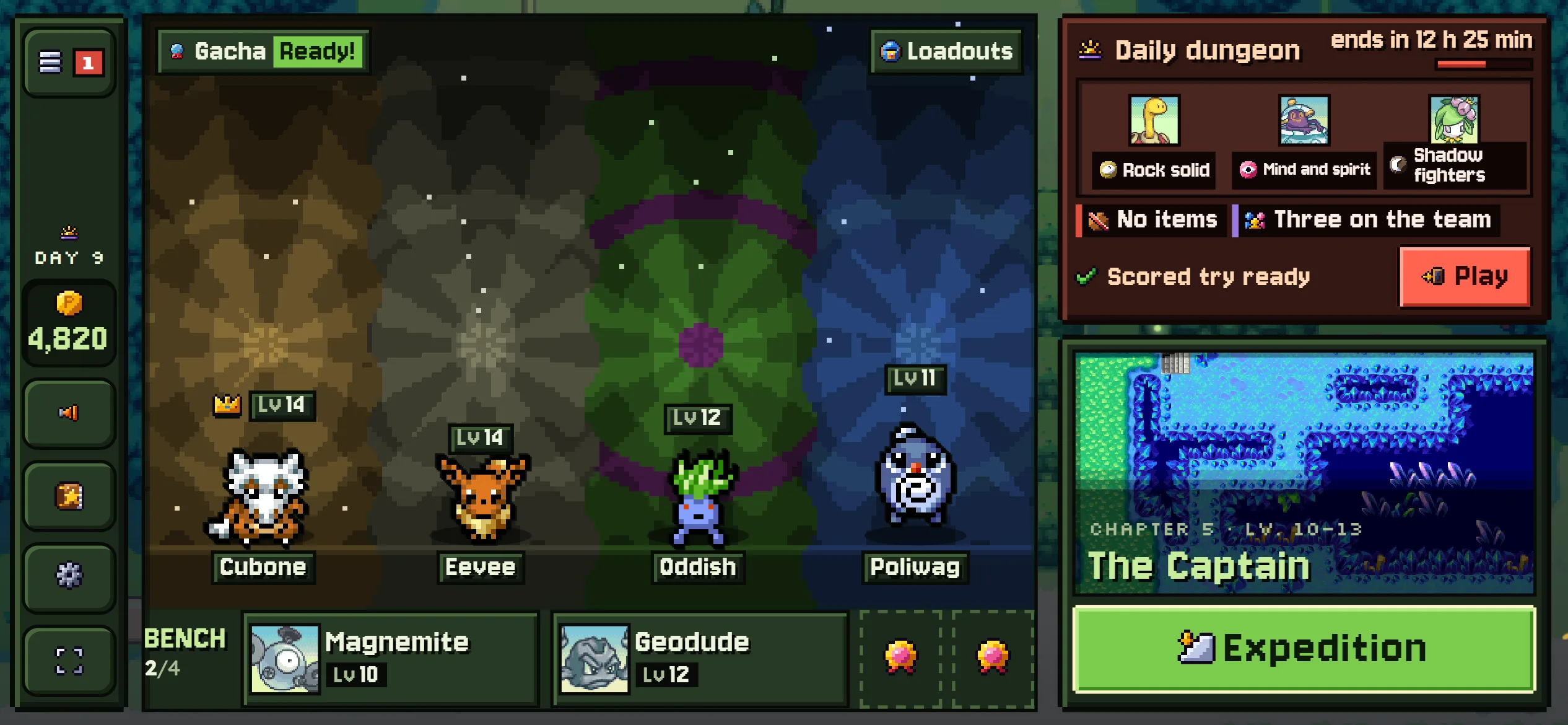
The camp is the one screen you come back to between expeditions. There is no town to walk around: your team stands on the path in front of the base, the keepers' menus sit beside it, and the big Expedition button takes you out the gate.
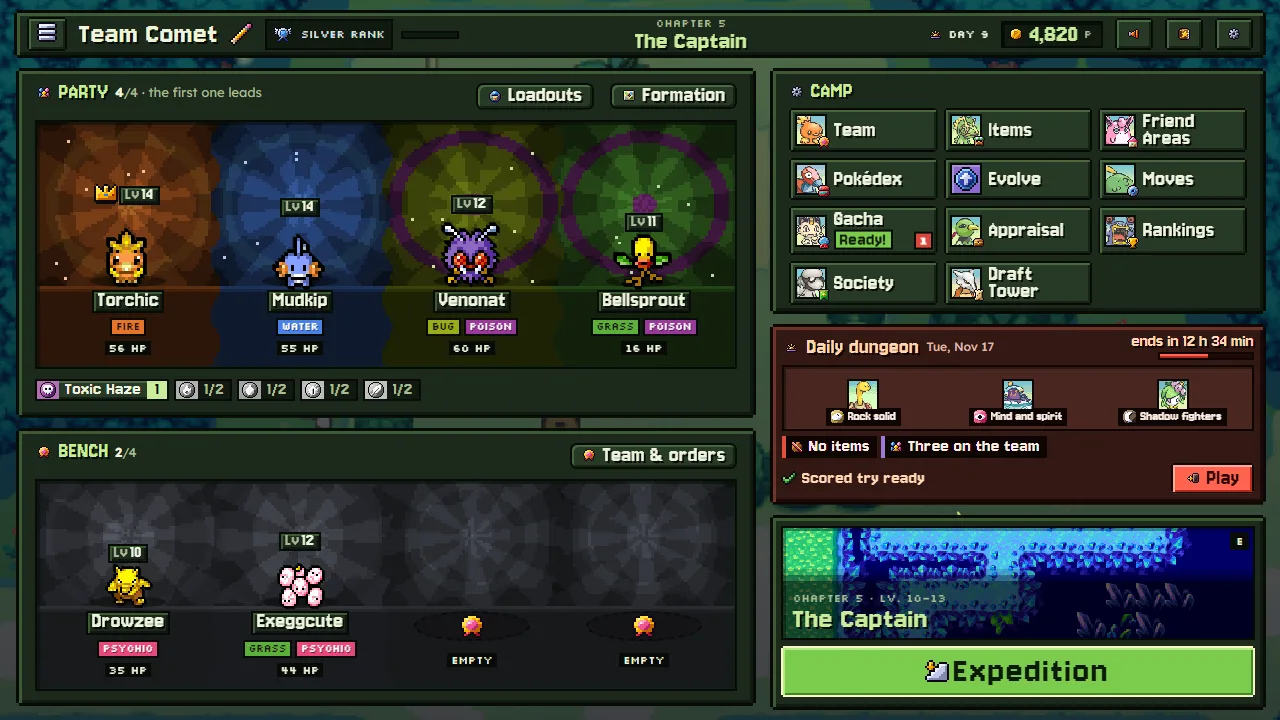
The top bar
Up top you see your team's name, its rank, the day and your Poké, then the News, the Journal and Settings. Tap the team's name to rename it.
- Rank: clears, Draft Tower floors, Dojo wins and the daily dungeon earn rank points, and your team climbs fifteen ranks from Normal to Guildmaster, then Guild stars. Each rank-up brings the Guild's gifts, and a higher rank widens Kecleon's daily stock. Tap the rank badge to see every rank and its gifts; a number on it counts the gifts waiting to be opened. See Team rank.
- The day: a day passes each time an expedition ends, however it ends, as long as your team won at least one fight on it. Come home without a single win and it is still the same day. A new day brings a new free capsule at Meowth's and new stock at Kecleon's.
- Poké: the money you carry. Poké you put in storage at Kecleon's is counted apart, and it is safe even when an expedition fails.
The party and the bench
The party is the four Pokémon who walk into dungeons, and the first one leads. Anyone else on the bench comes along too and can take a party member's place between fights. Everyone else lives at home in their Friend Area.
Each party member stands in a light of its own types' colours. The bench stands in grey, and still: those are resting. When one joins the party its colour rises up from the floor; one sent to the bench fades back to grey.
- Drag a card onto another to swap them: a bench member onto a party member, or the other way round. A party member dropped on a free bench seat rests there; a bench member dropped on a free party place joins. On a phone, long-press a card to drag it.
- Or tap a Pokémon to open its window: from there make it the leader, add it to the party, send it to the bench or home to its Friend Area, swap it with someone else, or open its page. The ◀ ▶ arrows go through the rest of the team.
- Tap an empty place in the party to pick who joins it from the bench, or an empty bench seat to pick who rests there.
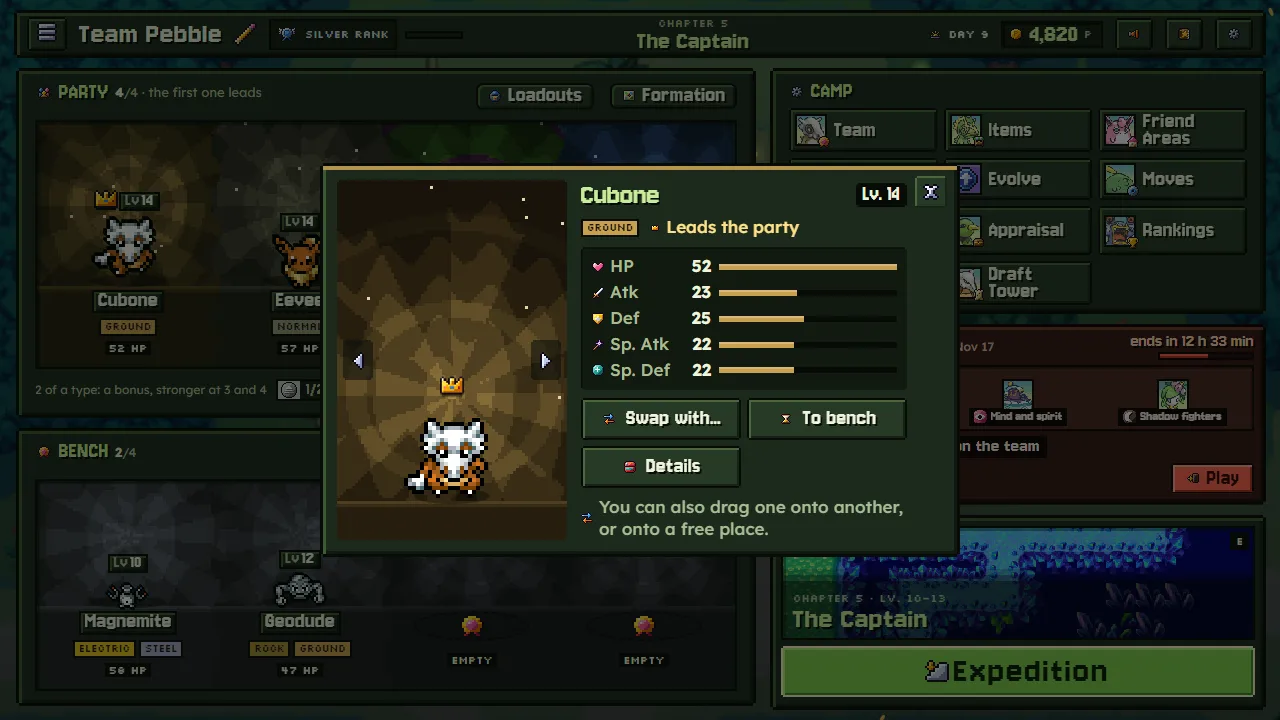
- Formation, in the party's header, sets where each member stands when a fight begins. See Deploy and the Formation.
- The strip of type chips shows your party's synergies: two of a type light up a bonus, stronger at three and four. See Type synergies.
The Expedition button
Expedition (E) opens the gate: the next story chapter, or a free expedition to any dungeon you have opened. Under it, Go again (R) sets out on your last free expedition once more, with the same dungeon, length and trip settings. If an expedition is still under way, the button says Resume. See Expeditions.
The services
Each keeper explains their own menu the first time you open it, and the Journal can play those guides again. A badge on a tile tells you something is waiting there: today's free capsule, boxes to open, a Pokémon ready to evolve, how many can go a star up (on Team), or a New! menu you have not opened yet.
| Menu | Who | What it does | Opens |
|---|---|---|---|
| Team | Your partner | Your Pokémon: stats, moves, IQ, held items, tactics, stars, the party | From the start |
| Items | Kecleon | Buy, sell, storage, Gummis and vitamins, refining held items: Items and Kecleon's shop | From the start |
| Gacha | Meowth | A free capsule a day, then more for Poké: Recruiting | From the start |
| Friend Areas | Wigglytuff | Homes your recruits need before they can join: Friend Areas | From the start |
| Appraisal | Xatu | Opens the treasure boxes you bring home, for free: Treasure boxes and Xatu | From the start |
| Evolve | Your partner | Luminous Cave: who is ready to evolve, and what each evolution needs: Evolution | From the start |
| Moves | Gulpin | Relearn moves, teach TMs, forget a move, link two moves: Moves and links | From the start |
| Pokédex | Porygon | Every Pokémon you have met, rewards for owning enough, and the key items: The Pokédex | From the start |
| Society | Smeargle | Bands of explorers with shared bonuses and a weekly boss: Expedition Societies | Chapter 2 |
| Daily dungeon | Spinda | A new dungeon every day, the same for everyone, with a ready-made team | Chapter 3 |
| Rankings | Loudred | The boards for the daily, the week, the Draft Tower, the Dojo and more: Daily dungeon and Rankings | Chapter 3 |
| Draft Tower | Marowak | Build a team from nothing, floor by floor: The Draft Tower | Chapter 4 |
| Loadouts | Your partner | Saved teams and the bags they take: Loadouts | Chapter 5 |
| Dojo | Makuhita | Fight other explorers' teams, ranked or casual: Dojo and rival teams | Chapter 6 |
| Swap Shop | Croagunk | Swaps exclusive items: three of yours and Poké for one you want: Croagunk's Swap Shop | Chapter 8 |
"Chapter 3" means it opens once chapter 2's boss is beaten, and so on. The menus open a little at a time as the story goes on, so the camp never fills up all at once. Founding a Society of your own needs chapter 4 cleared and costs 5,000 Poké; joining one only needs the Hall to be open. Societies, a place on the Rankings and a Dojo belt need a registered account. After the story, the camp has a little more to show: see After the story.
While an expedition is under way
You can come back to camp in the middle of an expedition, but Kecleon's shop, Meowth's Gacha and Xatu wait until it is over. The camp asks whether to go back to it, and the expedition also waits at the gate until you pick it up again.
The camp's menu
The Journal (every chapter and scene you have seen, to watch again, your team's records and the keepers' guides) has its button on the top bar, beside Settings, with its unread pages counted on it. The ☰ menu holds the Journal too, with Save, Settings and the way back to the title; in a narrow window or on a phone, where the Journal's button doesn't fit, the ☰ menu's badge counts what is waiting there.
Keys and phones
At camp: E Expedition, R Go again, T the Team page, I Kecleon's shop, Escape the menu. Every key can be changed in Settings → Controls, and a gamepad works everywhere.